
SSO ID Recover – Restore Your Account
For residents of Rajasthan, using digital government services has become easier than ever. By the SSO Portal, citizens can now access various services like emitra rajasthan portal, Jan Soochna Portal, and government job applications using a single login ID known as SSO ID.

But what if you forget your SSO ID or password? This is a common problem, especially if you don’t use the portal often. In this guide, we will explain the process of SSO ID Recover, reset your password, and make sure you don’t face this issue again in the future.
What is an SSO ID?
SSO stands for Single Sign-On. An SSO ID is your unique login ID that gives you access to all online services offered by the Rajasthan Government. Instead of creating multiple accounts for different departments, you only need one SSO ID to:
- Pay utility bills through eMitra
- Access schemes and services via the Jan Soochna Portal
- Apply for government jobs in Rajasthan
- Download and submit forms online
- Get information about pensions, health, education, and more

You can create your SSO ID using a mobile number, email ID, Bhamashah ID, or Aadhaar number.
Why Is SSO ID Important?
SSO ID is more than just a login name. It is your digital identity. It connects you to services like:
- eMitra Rajasthan: For paying bills, applying for certificates, and other services
- Jan Soochna Portal: For viewing schemes, department data, and benefits
- RPSC & Government Job Portals: To apply for jobs online
- RajSSP: For checking social security and pension details
- And over 100+ other government services
Without your SSO ID, you cannot access these services online. That’s why it is important to know how to recover it.
Common Reasons for Losing Access to SSO ID
There are many reasons why users lose access to their SSO ID. Here are the most common ones:
- Forgotten SSO ID or username
- Lost or changed mobile number or email address
- Forgotten password
- Account locked due to multiple wrong attempts
- Inactivity for a long time
If you’re facing any of the above problems, follow the instructions below to get your account back. Regardless of the reason, SSO ID Recover is possible if you follow the correct steps.
How to Recover SSO ID? Step-by-Step Guide
If you don’t remember your SSO ID, don’t worry. Follow these steps:
Visit the Official SSO Portal
- Open your web browser and go to https://sso.rajasthan.gov.in
- This is the only official website of Rajasthan SSO. Never use third-party sites for login or password reset.
Click on “Forgot SSO ID”
On the login page, you’ll see a link that says “Forgot SSO ID” below the login fields. Click on it.

Enter Your Details
You will be asked to enter one of the following:
- Registered mobile number
- Registered email ID
- Aadhaar number (if it was used during registration)
Make sure the information you provide is the same one you used when you created your SSO ID.
Enter OTP (One-Time Password)
You will get an OTP on your registered mobile number or email. Enter this OTP on the screen to continue.
Recover Your SSO ID
Once the OTP is verified, your SSO ID will be shown on the screen. Save it somewhere safe, write it down, or store it in your phone.
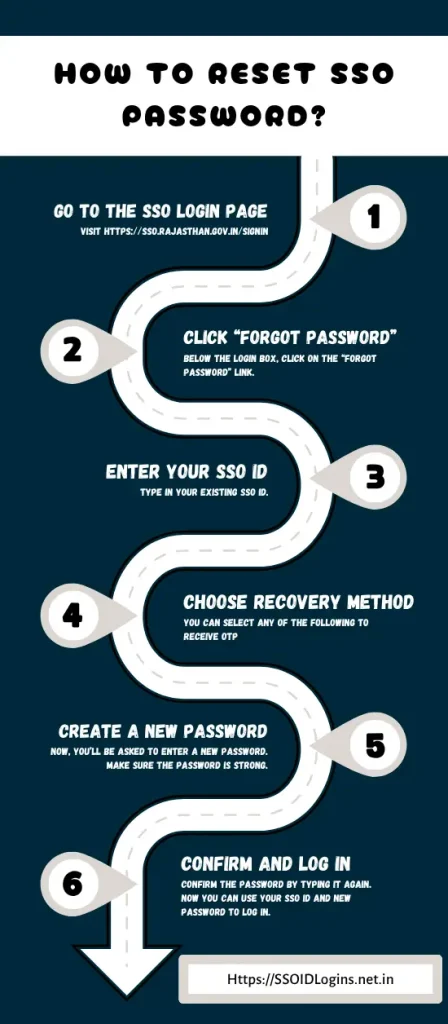
How to Reset SSO Password? Step-by-Step Guide
If you remember your SSO ID but forgot your password, here’s how you can reset it:
Tips to Prevent Future SSO ID Recover Issues
To avoid losing your SSO ID or password in the future, follow these simple tips:
- Link both mobile and email ID to your account during registration.
- Save your SSO ID in a secure place (write it down or save it digitally).
- Use a password manager app to store your login details.
- Update your mobile number and email if they change.
- Change your password from time to time for extra security.
- Never share your SSO ID or password with anyone else.
If you’re still not able to recover your SSO ID or password online, you can visit your nearest eMitra center. The staff there can help you:
- Recover your SSO ID
- Update your mobile or email
- Reset your password
- Unlock your account
Frequently Asked Questions
Conclusion
Forgetting your SSO ID or password is common, but SSO ID Recover is a quick and easy process if you follow the steps correctly. By following the step-by-step instructions above, you can easily regain access to your account. Keep your login details safe and up to date, and always use the official SSO portal for secure access.
If needed, visit your nearest eMitra center for support. Your digital identity is important; keep it secure and accessible at all times.

He has over five years of experience in writing helpful guides that make it easier for people to understand and use digital platforms. His main focus is to help users complete tasks online without confusion or stress. Advik believes that everyone should be able to use government services, even if they are not very familiar with technology. He enjoys turning difficult topics into simple step-by-step information that anyone can follow. In his free time, he reads about new tech trends and looks for ways to make digital tools more useful for everyday people.


