
eMitra Rajasthan Portal
If you live in Rajasthan, managing government-related tasks is now easier than ever. With the eMitra Rajasthan portal, you don’t need to stand in long queues or visit different government offices. Whether you want to apply for certificates, pay utility bills, or check the status of your applications, you can do it all from your home.

You’ll learn everything about the eMitra Rajasthan portal, how to register, log in, check services, documents needed, fees involved, and much more.
What is eMitra Rajasthan Portal?
The eMitra Rajasthan Portal is an online service delivery platform launched by the Rajasthan Government. It was introduced to make public services easily accessible to people across the Rajasthan state.
It provides access to hundreds of government and private services through a single digital platform. You don’t need to stand in long lines anymore. You just need an internet connection to get things done. Here are the key Features of eMitra Rajasthan:
- Offers more than 300+ services
- Accessible via mobile, desktop, and kiosks
- Available 24/7 online
- Real-time application tracking
- Supports both urban and rural areas
How to Register on the eMitra Portal?
To access all government services available on the eMitra Rajasthan Portal, you must first complete the user registration process. The registration is completely free and can be done online in just a few steps. Here is the step-by-step Process to Register on the eMitra Portal:
Visit the Official Website
First, open your browser and go to the official eMitra portal by visiting https://emitra.rajasthan.gov.in.
Click on ‘Login’ Button
On the homepage, click the ‘Login’ button available at the top right corner of the screen. From the drop-down menu, select the ‘Citizen’ option.
Access the SSO Rajasthan Portal
After selecting ‘Citizen’, the website will automatically redirect you to the SSO Rajasthan Portal, where the actual registration takes place.
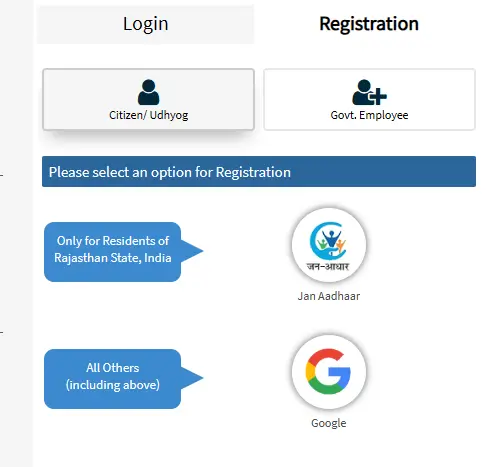
Create Your SSO ID
To register yourself, you need to create a Single Sign-On ID. You can create this ID by using one of the following identity verification methods:
- Aadhaar Card
- Bhamashah ID
- Facebook Account
- Google Account

Complete the Registration Form
Fill out the required personal details on the registration form. Make sure to provide accurate information for identity verification.
Log In with Your SSO ID
Once your SSO ID is created, use it to log in to the eMitra portal. This ID will be your unique login credential for all government services. If you’re trying to log in to your eMitra account but can’t remember your credentials, it’s a common issue. Many users often wonder how to get SSO ID password when they face login problems. Luckily, the process is simple and quick.
Link Your Mobile Number and Update Profile
After logging in, the system will ask you to verify and link your mobile number. Once verified, complete your user profile by filling in all necessary details such as address, email, and ID proof. Documents Required for Registration:
- Aadhaar Card
- Mobile number linked with Aadhaar
- Valid Email ID
- Bhamashah ID
Services Available on eMitra Rajasthan Portal
You get access to more than 300 services on the eMitra Rajasthan platform. These include both government and private sector services.
- Birth and death certificate application
- Caste and income certificate
- Electricity and water bill payment
- Scholarship applications
- Labor card and pension schemes
- Ration card application
- Land record services like Jamabandi / Nakal
- Mobile recharge and DTH payment
- PAN card application
- Insurance premium payments
- Railway ticket booking
How to Log In to the eMitra Rajasthan Portal?
Once you have successfully registered on the eMitra Rajasthan Portal, you can log in at any time to access the wide range of government services available to citizens, kiosk operators, and government officials. Follow the steps below to log in to your account on the eMitra platform:
- Open your web browser and go to the official website: https://emitra.rajasthan.gov.in
- On the homepage, click the ‘Login’ button located at the top right corner of the screen.
- Choose your user type from the available options:
- Citizen
- Kiosk
- Government Officer
- Input your SSO ID and password in the respective fields.
- If two-step verification is enabled, enter the One-Time Password sent to your registered mobile number to proceed.
- After successful verification, you will be redirected to your user dashboard, where you can manage all your activities.
What Can You Do After Logging In?
Once you are logged in to your eMitra account, you can easily manage government-related tasks and services directly from your dashboard:
- You can view a list of available services and apply for any required certificates, documents, or utility services.
- Keep an eye on the progress of your service requests and applications in real time.
- Easily access and download receipts, certificates, and approvals issued through the portal.
How to Apply for Services on eMitra?
Once logged in, applying for services is quick and easy. You don’t need to visit offices or pay extra to middlemen. Here are simple steps to apply:
- Login with your SSO ID
- Select the desired service from the dashboard
- Fill in the required details
- Upload necessary documents
- Pay the fee, if applicable
- Submit the form
You’ll receive an acknowledgment number or token to track your application.
How to Check eMitra Token Status?
After you apply for any service, you can check the status of your request using the token number. Follow these steps to check token status:
- Visit: https://emitra.rajasthan.gov.in
- Click on ‘Track Application’
- Enter your Token Number
- Click Search
- You’ll see the live status of your application
- Application approval
- Document verification
- Certificate generation
How to Apply for eMitra Kiosk?
If you want to open your own eMitra center, you can apply online through the portal.
- Go to the eMitra website
- Scroll down and click on ‘Apply for Kiosk’
- Fill in the application form
- Upload the necessary documents
- Submit and wait for approval
- Aadhaar Card
- Residence Proof
- Educational Certificate
- Passport Size Photo
- Earn income by providing services
- Become a government service partner
- Help your local community
Benefits of Using eMitra Portal
Using the eMitra Rajasthan Portal offers numerous advantages that save both your time and energy. Instead of physically visiting multiple government offices for different services, citizens can now complete almost all tasks online, from the comfort of their homes.
With instant receipts and real-time updates, you remain informed at every stage of your application or payment process.
- Saves time and eliminates the need to travel to different government offices.
- Provides a digital and transparent system for government services.
- Easy-to-use portal suitable for individuals of all age groups.
- Offers instant receipts and real-time application status updates.
- Available in both Hindi and English for broader accessibility.
Who Can Use the eMitra Portal?
The eMitra Portal is developed to serve every section of society. Whether you’re a student applying for a scholarship, a farmer accessing agricultural schemes, or a working professional needing official certificates, this portal brings convenience to your fingertips. Even senior citizens and small-scale entrepreneurs can use the portal without any difficulty.
With just a mobile phone or a computer, they can manage critical government-related tasks independently, without having to step out or face administrative delays.
- Students can apply for scholarships, download mark sheets, and access academic documents.
- Farmers can register for subsidies, view land records, and check government schemes.
- Working professionals can apply for income, caste, and domicile certificates.
- Retired citizens can use pension-related services and access important health records.
- Small business owners can apply for shop licenses, business registrations, and tenders.
Common Issues and How to Fix Them
Sometimes you might face login errors or slow portal response. These are common and fixable.
Frequently Asked Questions
Conclusion
The eMitra Rajasthan Portal is your one-stop digital platform for all government and utility services. You no longer need to worry about delays or confusion; just use your SSO ID, log in, and start exploring over 300+ services from the comfort of your home. Make sure to keep your Aadhaar and mobile number ready. If you face any issues, the portal also provides real-time support through helplines.

He has over five years of experience in writing helpful guides that make it easier for people to understand and use digital platforms. His main focus is to help users complete tasks online without confusion or stress. Advik believes that everyone should be able to use government services, even if they are not very familiar with technology. He enjoys turning difficult topics into simple step-by-step information that anyone can follow. In his free time, he reads about new tech trends and looks for ways to make digital tools more useful for everyday people.